Key Takeaways
- • ROI isn’t always about money coming in – sometimes it’s about visibility improvements you can measure in free tools
- • You need at least 6 months to see meaningful results from organic growth efforts
- • Google Search Console and Google Analytics 4 are free and show everything you need to track
- • The most accurate ROI tracking: compare dollars invested against actual deals closed within realistic timeframes
- • Shift your measurement window based on your sales cycle – don’t expect immediate returns from long-term strategies
What should I actually look at before calculating ROI?
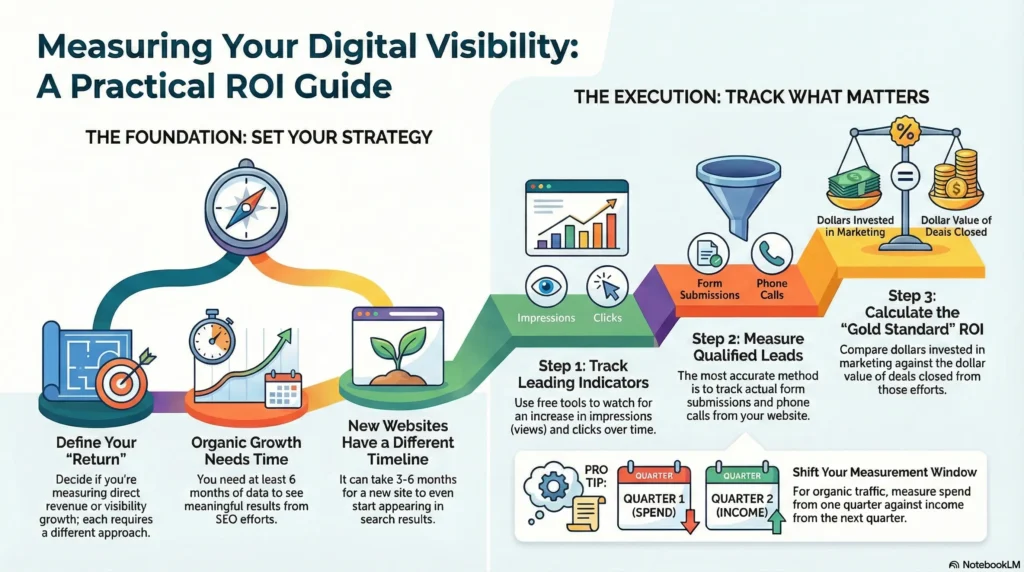
First, define what ROI means for you. Is it money in the bank, or are you satisfied seeing more people find your business online? Both are valid, but they require different measurement approaches.
Timeline matters more than most business owners realize. If you’re investing in organic growth (SEO, content marketing), you need to look at least 6 months of data. Anything shorter won’t tell you much. Paid advertising shows results faster, but organic efforts take time to compound.
Your website’s age changes everything. Brand new websites sometimes take 3-6 months just to start appearing in search results. If your site launched recently, traditional ROI calculations don’t make sense yet – you’re still in the foundation-building phase.
How do I know if my online visibility efforts are working?
Start with impressions in Google Search Console. This shows how many times your website appeared in search results. It’s usually the first metric that moves when you invest in visibility. Find it under Performance in Search Console – no paid tools required.
Clicks come next, but they lag behind impressions. Months might pass between your first impressions and your first clicks, so be patient. Look for trends – are clicks growing or declining over time? That’s what matters, not the absolute numbers.
Check Traffic Acquisition in Google Analytics 4. This report shows where visitors come from – organic search, social media, paid ads, or direct traffic. It helps you understand which efforts actually drive people to your site. The basic setup works fine, though setting up conversion tracking (like form submissions) gives you better insights.
What’s the most accurate way to measure ROI?
Track form submissions, excluding spam. This tells you how many real people actually contacted you. Two things make this more accurate:
Add hidden fields to your website forms that capture the visitor’s source automatically. This helps you categorize leads and understand which marketing efforts pay off. Then set up a simple Looker report (free tool) to see submissions per source per time period. You’ll analyze your data in under 2 minutes instead of spending hours in spreadsheets.
If people call you instead of filling out forms, phone tracking tools (these are paid) can assign calls to specific sources – exactly what you want for accurate tracking.
The gold standard is inputting real numbers: dollars invested in online visibility over a time period versus the dollar value of deals closed in that same period. Calculate this per source (organic only, ads only) and across all sources combined. Both views matter because sources influence each other. Someone might find you through ads but buy because of your organic content. Or they discover you on social media but convert thanks to your website.
How do I know if my ROI is actually good?
Context matters. An ROI above 1 isn’t always the goal, and below 1 isn’t always bad. If you do appliance repairs with quick sales cycles, the math is straightforward. But if you’re a consultant where customer lifetime value is high, an ROI below 1 might still make sense because you know long-term value compensates for initial costs.
Google benchmarks for your industry if you’re uncertain what’s reasonable. Every business operates differently.
Timeframes matter too. Let’s say you spent $10K on marketing from March to May. Should you measure income from March to May? Not exactly. Shift your measurement window based on your sales cycle.
For paid traffic, shift by your sales cycle duration. If closing deals takes 30 days, measure March-May spending against April-June income. This accounts for the time needed to close deals.
For organic traffic, shift at least 3 months plus your sales cycle. So $10K spent March-May should be measured against July-September income. Organic results arrive slowly, and stretching timeframes to 6-9 months gives more accurate insights. Seasonality also affects organic differently than paid ads.
Is there a simpler way to calculate this?
You can assign an arbitrary dollar value to each lead – say $2,500 average revenue per lead. This simplifies calculations and you can even automate it in GA4. But it’s less accurate because not every lead becomes a customer.
That’s where conversion optimization comes in. If you get lots of traffic but only close 20% of leads, add pre-qualifiers to your website. You’ll receive fewer leads, but close more of them. This makes your arbitrary-value calculations more accurate.
Summary
Tracking the ROI of online visibility campaigns doesn’t require expensive tools – Google Search Console and Analytics 4 handle most of what you need. Start by defining what ROI means for your business, choose realistic timeframes (minimum 6 months for organic), and match your measurement approach to your website’s stage. Early-stage sites should track impressions and clicks. Established sites can focus on form submissions and closed deals. The complexity of your tracking depends on how detailed you want to get, but the fundamentals remain straightforward.